SlopCodeBench experiment

Brett Dargan
Principal Solutions Architect (AWS) | Tech Co-Founder | Product Strategy & Business Value
SlopCodeBench experiment
https://arxiv.org/abs/2603.24755 npx aislop scan
https://arxiv.org/abs/2603.24755 npx aislop scan
OpenAPPA sits between an agent and its tools and answers one question before every action: is this data allowed to go to this destination?
It is powered by APPA (Agentic Permissions Policy Algebra). OpenAPPA tracks the sensitivity and trust of everything an agent reads and checks each tool call against it before the call runs, so sensitive data never reaches an unauthorized tool. Classifiers and PII detectors are probabilistic, while this check is deterministic and returns the same decision on every run.
OpenAPPA is a frontier deterministic AI guardrail that is 100% resistant to data exfiltration caused by prompt injection or model hallucination, and the first of its kind that doesn’t break agents.
While Jev has had lots of publicity last week there are alternatives if like: Laya, Gliner and semif-rs.
Jev and alike are not LLMs.
Jev, GLiNER 2.5 (Decide) are non-generative, “System One” decision models built to output structured data and probabilities rather than conversational text
laya-rs vs jev vs gliner-rs vs semif-rs: typed-decisions comparison · GitHub
I Tested Jev vs 12 Local Decision Models. Here’s What I’d Use… - YouTube
Unlike traditional LLMs that rely on RLHF (Reinforcement Learning from Human Feedback)—where a model is rewarded for writing a response that looks pleasing to a human—RLCD trains the model based on objective correctness. The model is treated as an RL agent that interacts with data and rules, earning rewards when its structured output aligns perfectly with the ground truth or specified operational constraints.
In standard classification or generative models, a confidence score of 90% does not always mean the answer is right 90% of the time (models are notoriously overconfident). RLCD specifically shapes the loss function and optimization strategy to calibrate the probabilities. This means if the model assigns a 0.85 probability to an API routing rule, it mathematically represents an exact 85% statistical likelihood of being correct.
From an architectural standpoint, instead of generating token-by-token (like a standard GPT model), it relies on an encoder-based architecture. It processes the input and evaluates the target rules or typed questions simultaneously in a single parallel pass.
Thoughtful blogs from figma engineering:
Always on the lookout for some AI local options and this project got my attention:
Another great Beyond Coding interview AWS Veteran: The New Software Development Life Cycle - YouTube.
The most practical takeaway is Lessa’s model cost discipline. After a single refactor cost 200 million tokens because Opus was “overthinking” every line, he split the workflow into three tiers:
Tier 1 — SOTA models (Opus, Sonnet): planning, spec writing, architecture decisions only Tier 2 — Mid-tier models: 70–80% of implementation work Tier 3 — Cheap models: code review, linting, adversarial checks
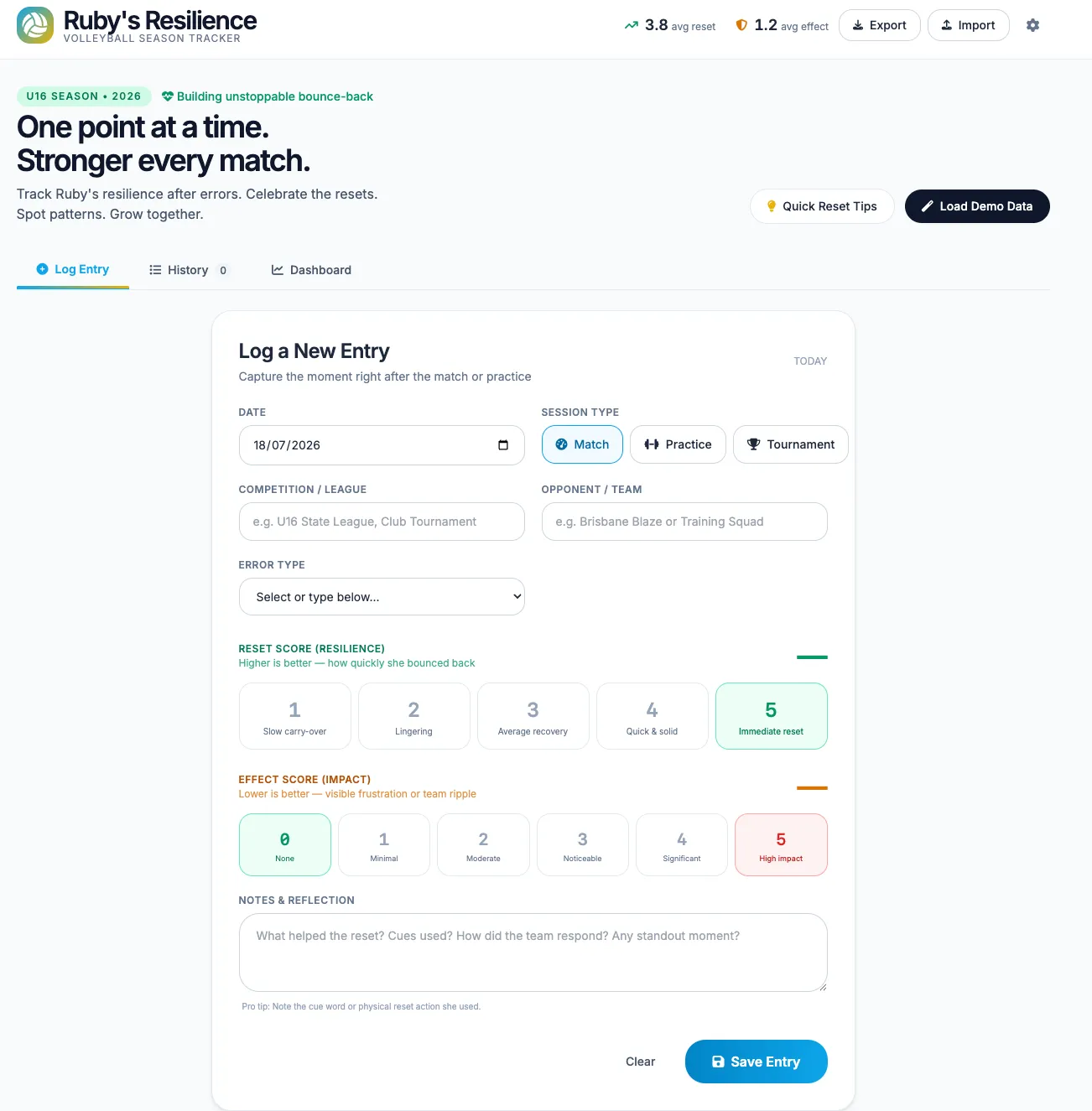 See the mvp here: Reset Tracker
I’m building my new custom low-profile 38-key (3x6) -2 +3 thumbs - but I need to solve a problem I’ll hit.
My Piantor is configured with Vial / QMK with
The mac internal keyboard has no layers and minimal special functions.
The workaround so far: switch input source to Colemak-DH when on laptop with internal keyboard and to Australia when using the Piantor split keeb. Lots of down-sides:
I’ve researched most of this before, I’ve tried Karabiner-Elements but I didn’t want the complexity of the kernal extension. I’d come across kanata, saw it needed that as a dependency and wrote it off.
A chance Gemini / Google AI mode question put me onto the path that let me rediscover kanata and how it can depend on the karabiner device-kit architecture. 6.2.0
The result is I have a working base kanata configuration with qwerty (for others/troubleshooting) and colemak-dh. Keeps my Aerospace shortcuts same for either layout. I’ll continue to add the additional layers and combo keys I have from vial.
This enables me to try Sturdy / Magic Sturdy regularly till proficient - when working
It’s not 100% smooth, I’ll keep testing out and find any other issues. E.g My Arc shortcuts aren’t working.
Continual probing of AI helps us explore the problem space and solution space quickly to eliminate sub-par paths and save time. I re-discovered a major problem worth solving (the issue was back of mind) it can help find the path to follow before commiting much time.
R&D / AI: Mini-RAG Cross-Encoder Efficiency Evaluation
Plenty of strong RAG content exists on papers and evaluation (e.g., Miraflow Guide).
Forked florianbuetow/mini-rag for local deep dive: how much efficiency gain from the cross-encoder?
Added token test in bdargan/mini-rag + bdargan/mini-rag-runner container. (Output posted below showing savings.)
See rag_token_test.py.
[TOKEN BENCHMARK REPORT] • Baseline Prompt Tokens (K=10): 308 • Reranked Prompt Tokens (K=3): 112 • Absolute Token Savings: 196 • Efficiency Gains: 63.64%PASSEDWell this will be useful. AWS introduces Lambda MicroVMs for isolated execution of user and AI-generated code - AWS
Do you also struggle with those “frog” tasks that are important, but somehow you procrastinate enough to always put them off, till I probably used more time avoiding than it actually takes to complete. :facepalm:
Well I was trying a few ideas, beyond Eisenhower matrix, and came across the low energy task model and the Friction-Sized framework.
Google AI suggested a method to combine, so if identify tasks in md with X.Y.Z, it offered variations depending on tools used and search/filter needs see query
X=Importance (1-2) Y=Urgency (1-2) Z=Friction (1-4)
Z is 1-4 quadrants even though my rule of thumb is to batch the little things for a low energy time. I may sometimes hit those < 2mins immediately and skip the overhead of writing it down, but how many things reallly are 2mins and don’t spin you off distracted elsewhere.
An interesting experiment to help me match my mental energy with different tasks.
Because these tasks have deadlines and evoke reluctance, traditional advice like “Eat the Frog” actually backfires. When your mental energy is depleted, staring at a giant “frog” causes Executive Dysfunction—making you freeze and do nothing.To solve this, we must mathematically re-engineer how we measure task weight. Instead of measuring by Time (Duration), we must measure by Friction (Resistance to Start).
Total Effort = Friction (Energy to Start) + Drag (Energy to Complete)
Use this 4-quadrant system to categorize both your work and personal life tasks. The goal is to isolate the “Sticky Notes”—tasks that take very little time to complete but have massive mental resistance.
| Low Drag (Takes <15 Mins) | High Drag (Takes >15 Mins) | |
|---|---|---|
| High Friction(Reluctant to Start) | 🛑 The Sticky Notes • Paying a bill / Renewing a license • Sending a “difficult” but short email • Booking a dentist appointment | 🐸 The True Frogs • Tax returns • Writing a project proposal • Planning a major trip |
| Low Friction(Easy to Start) | ⚡ Quick Wins • Deleting spam / Sorting mail • Putting away dishes • Approving a simple request | 🏃♂️ The Momentum Builders • Organizing a closet / Desk • Exercising / Walking • Data entry while listening to music2. |
To defeat the “Sticky Notes” and “True Frogs” before their deadlines hit, apply these rules:
Never write the actual task on your to-do list. Write the absolute first physical action.
Do not try to “Eat the Frog” all at once. Set a timer for exactly 10 minutes. Tell yourself: “I am allowed to completely stop and quit after 10 minutes.”
Never separate your personal and work to-do lists when energy is low. Your brain draws from the exact same central tank of mental energy for both. Batch your “Sticky Notes” (both work and personal) into a single 30-minute window right before lunch or at the very end of the day.
Interesting interview on AI guardrails through the use of tests with semgrep for various languages. Why The Best Software Engineers Are Solving Code Review Bottlenecks Now - YouTube
GitHub - florianbuetow/ai-guardrails: Templates for working with AI · GitHub
I quite like this chrome extension - https://github.com/atharvakadlag/excalisave plugin.
Only problem is the lack of alternative providers.
While having some time to kill (watching a youth volleyball grand final!). I had plenty of time between points to prompt.
I’m trying out different models and providers, so I gave Grok 4.1 with opencode.ai.
Couple more hours Monday morning to get it working. I was hoping to just be in product mode, but I had to go to the codeberg api docs to identify a cause of failure on document create was the incorrect HTTP method. Kinda annoying, it is clearly specified in the swagger docs.
Last iteration it needed network robustness, exponential backoff etc. and a more visual feedback.
It’s cost about $15 in tokens, which idk, I kinda expected it to have been < $10 AUD, going to be more < $20 ($USD 13). Either way it is pretty cheap - I’ll be using this weekly if not daily.
Excalisave fork https://github.com/bdargan/excalisave.
TLDR;
Compare and contrast Matt Pocock AI workflow, particularly around the use of skills /grill-with-docs different types of job types of Human In Loop vs. Away From Keyboard with Allium language and approach.
Try Matt Pocock skills, compare the improve codebase architecture skill with modularity tools from - GitHub - vladikk/modularity: Claude Code plugin for designing modular systems from functional requirements and reviewing existing codebases for modularity problems with actionable improvement recommendations. Based on the Balanced Coupling model. · GitHub and GitHub - JuliusBrussee/caveman: 🪨 why use many token when few token do trick — Claude Code skill that cuts 65% of tokens by talking like caveman · GitHub.
Compare results with a varion Kit approach. Been a slow month on prof. dev but I’ve come back to catch up on AI agent flows and particularly about a good approach and scaffolding to achieve good outcomes for AI adoption. While tooling is necessary, I want practical heuristics that can be applied generally.
Matt Pocock has done a decent job explaining his flows and how he focuses on skills to define the job to be done / prd and then how to get the issues/stories into vertical slices/tracer bullet (for pragprog) to guide towards modules with deep interfaces (Jonh Ouster)
I’ve got a growing list of skills to go back to.
Interesting Wardley maps claude skill
I’m on holidays this week but hope to try gemma4 locally with - Running OpenCode with Gemma 4 26B on macOS via llama.cpp - fixing tool calling · GitHub Vladd, author of Balanced Coupling in Software Design has released skills I’m keen to try - See GitHub - vladikk/modularity: Claude Code plugin for designing modular systems from functional requirements and reviewing existing codebases for modularity problems with actionable improvement recommendations. Based on the Balanced Coupling model. · GitHub.
Keep a lid on your token spend with Caveman - GitHub - JuliusBrussee/caveman: 🪨 why use many token when few token do trick — Claude Code skill that cuts 65% of tokens by talking like caveman · GitHub
Maybe I’ll get time to try this also - GitHub - ultraworkers/claw-code: The repo is finally unlocked. enjoy the party! The fastest repo in history to surpass 100K stars ⭐. Join Discord: https://discord.gg/5TUQKqFWd Built in Rust using oh-my-codex. · GitHub
Bit under-whelming, vs. general vibe results. I probably need to give it a generally well known problem to remix and regurgitate.
tbh, the bottom up and faster tools of Spec Kit and Open Spec I’ll probably lean towards.
But I’ll still need to try out BMAD and AgentOS for 1st hand experience.
Currently using Zellij and aerospace for terminal / browser window panes and keyboard short-cuts.
But with more AI workflows, maybe Theo is onto something: So I stopped using Ghostty… - YouTube
Will be interesting to see how this tech evolves: Privacy First: Building LLM-Powered Web Apps with client side WASM by Shivay Lamba & Saiyam Pathak - YouTube
OpenAI and Meta E9: The Career Bet Every Engineer Must Make - YouTube
Interesting to hear Plumbing and HVAC got mentioned in the first few minutes and stories of Plumbers making there own customer scheduler from AI.
Q: Have an untrusted code from your LLM?
Deno sandboxes might do the trick, or atleast show you how to.
Trying out Opencode with direct xAI provider.
Superlink bm25 and mixture of models.
GitHub - parthsarthi03/raptor: The official implementation of RAPTOR: Recursive Abstractive Processing for Tree-Organized Retrieval Airbnb Search Benchmarking - Comparison of retrieval techniques | VectorHub by Superlinked
Way back we used Elasticsearch for hotel search at Wotif.com, interesting this approach with mixing of models.
Watched an intewview with jamsocket creator in my local-first readings, plane is super interesting.